SF DeFacto #1 — Salesforce Headless Commerce Checkout with Saved Payment Method
The views and opinions expressed here are my own and do not represent those of my employer, Salesforce.
Context
This article showcases how to implement Commerce Checkout (Cart-to-Order) in a headless context using a combination of B2B and D2C Commerce, Salesforce Payments, and Salesforce Commerce Payments APIs.
This niche use case may be necessary if the following business requirements apply:
- Implement a headless checkout process (not relying on store managed checkout).
- Use a saved payment method instead of capturing payment details during checkout.
Notes
- A fully headless checkout with Salesforce Payments is not yet officially supported by Salesforce. This implementation presents a suggested solution based on personal experience with the Salesforce Payments capabilities.
Prerequisites
- Watch Salesforce Mojo’s video about Headless Commerce Checkout.
- Salesforce Payments must be configured in the org with a valid Merchant Account and associated Payment Method Sets.
- Set up Postman with the required authentication details for the external store user.
- This process assumes that an active cart with existing Cart Item records already exists.
Postman Collection
Import the following collection to access the APIs mentioned in this solution: Headless Commerce APIs.postman_collection.json.
Headless Commerce Checkout Process with Saved Payment Method (Salesforce Payments)
The following flow outlines the sequence of processes and API calls required to create an order from a cart. As mentioned in the notes section, the flow is not fully API-driven. Custom logic is introduced as a workaround after authorizing payment. This is necessary because the checkouts/active/payments API does not yet support Saved Payment Method records.
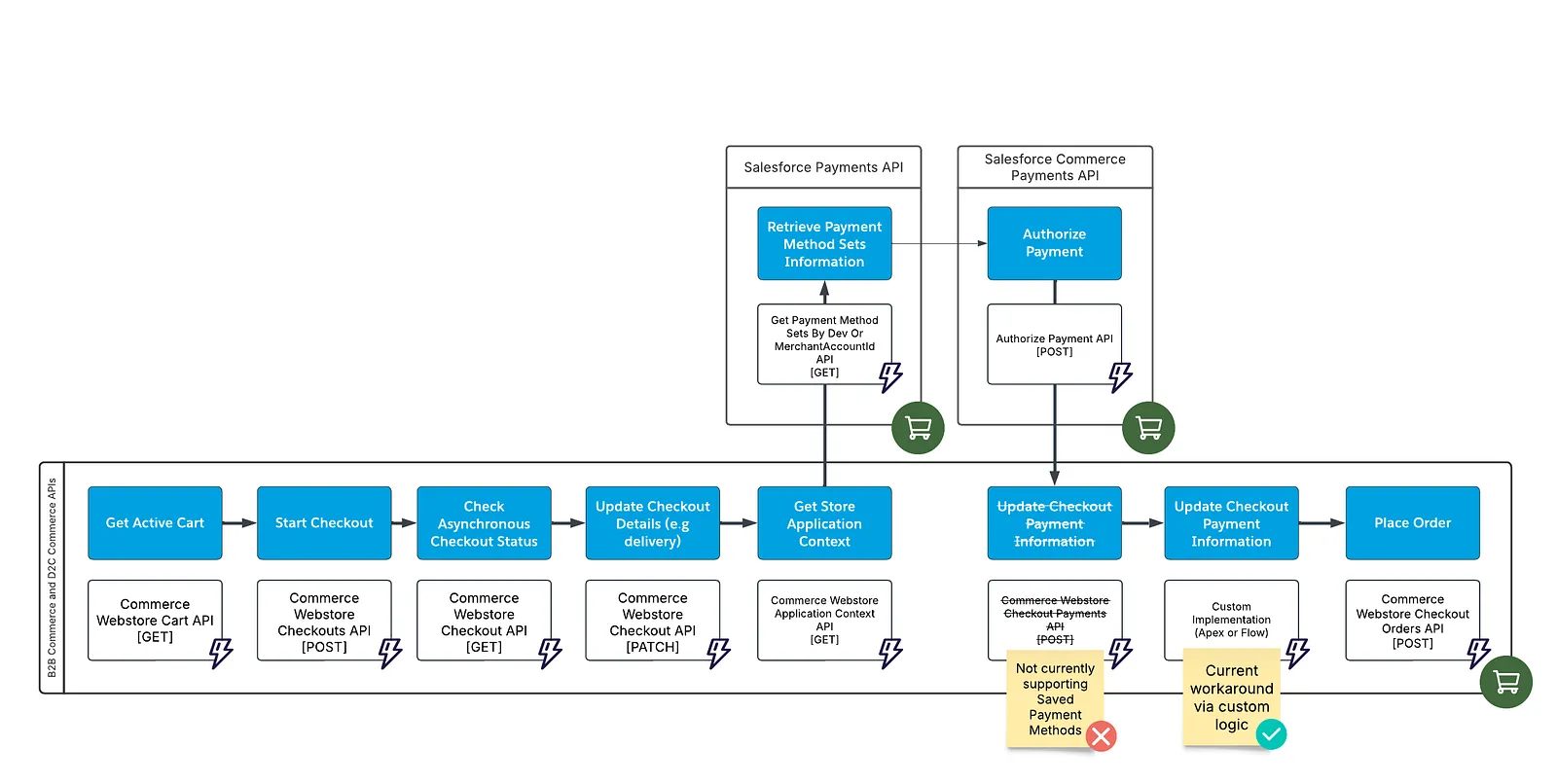
- Get Active Cart —
GETCommerce Webstore Cart - Start Checkout —
POSTCommerce Webstore Checkouts - Check Asynchronous Checkout Status —
GETCommerce Webstore Checkout- During the asynchronous checkout process (e.g., calculating shipping, taxes, promotions), GET requests return a 202 status. When processing is complete, requests return a 200 status with up-to-date data.
- Update Checkout Details —
PATCHCommerce Webstore Checkout- Must include data for only one sub-resource per call, such as contact information, shipping details, or delivery method.
- Get Store Application Context —
GETCommerce Webstore Application Context- Goal is to retrieve the
paymentMethodSetDevName.
- Goal is to retrieve the
- Retrieve Payment Method Sets Information —
GETGet Payment Method Sets By Dev Or MerchantAccountId- Extra permissions:
Authenticated Payerpermission set. - Goal is to retrieve the
gatewayId.
- Extra permissions:
- Authorize Payment —
POSTAuthorize PaymentpaymentGroup.sourceObjectIdcan be empty, as it will be populated after the order is placed.paymentMethod.idreferences the Saved Payment Method ID.
- Update Checkout Payment Information — custom logic
- Extra permissions: custom WebCart permissions.
- Custom logic updates
WebCart.PaymentMethodIdandWebCart.PaymentGroupId. These fields may not be updatable by external users due to license/sharing restrictions. Options for implementation include Composite API, Flows, or Apex.
- Place Order —
POSTCommerce Webstore Checkout Orders
Additional Resources
This article is also available on Medium — this page is the canonical, updated version.